
As an Amazon Associate I earn from qualifying purchases. This post contains affiliate links (paid links). If you buy through them, Comedy Houston earns a small commission at no extra cost to you. It helps keep our show listings free.
Looking for a stage microphone rather than a recorder? We wrote a dedicated guide to the best microphones for stand-up comedy, from the SM58 standard to wireless rigs and filming kits. This page covers the recorders that capture your set.
The short answer: buy the Zoom H6essential. It records the comedian’s mic feed and the audience on separate tracks, and 32-bit float means you never clip a punchline. If money is tight and you only need the mic feed, the Zoom H4essential does that for about $220. If there is no soundboard to plug into, clip a Rode Wireless GO (Gen 3) on the comic. The full breakdown, including how to get the board feed, is below.
Quick Picks: Best Audio Recorders for Stand-Up Comedy (September 2026)
| Best for | Recorder | Why | Price |
|---|---|---|---|
| Best overall | Zoom H6essential | Board feed plus audience on separate tracks, never clips | Check price on Amazon |
| Budget multi-track | Zoom H4essential | Two XLR inputs, same 32-bit float | Check price on Amazon |
| Smallest pro recorder | Zoom F3 | Deck-of-cards size, plug in and record | Check price on Amazon |
| No soundboard in the room | Rode Wireless GO (Gen 3) | Wireless lav on the comic, records on the transmitter | Check price on Amazon |
| Clip it and forget it | Tascam DR-10L Pro | One-button lav recorder | Check price on Amazon |
| Filming a special | Sound Devices MixPre-3 II | The professional standard | Check price on Amazon |
Prices checked on Amazon September 3, 2026. They change often, so the links always show the current price. Paid links.
In This Guide:
- Quick Picks (the short answer)
- Why Audio Is the Difference Between Amateur and Professional Comedy Clips
- The Two-Source Rule: Why You Need Separate Audio
- How to Get the Comedian’s Audio
- How to Get the Audience Audio
- What Is 32-Bit Float Recording (And Why It Matters for Comedy)
- The Best Audio Recorders for Stand-Up Comedy
- Audio Setup Combos by Budget
- Common Audio Mistakes Comedians Make
- Conclusion
- FAQ
Why Audio Is the Difference Between Amateur and Professional Comedy Clips
Here’s a truth most comedians learn the hard way: bad audio will kill a great clip faster than bad video.
People will watch a slightly grainy or poorly lit comedy clip if the audio is clean and the laughs are loud. But nobody, absolutely nobody, will sit through a clip where the comedian sounds like they’re talking through a tin can, or where you can barely hear the audience laughing. They’ll scroll past in half a second.
I’ve filmed over 1,000 stand-up comedy sets, and the single biggest upgrade I made to my clips wasn’t a better camera or a fancier lens. It was getting the audio right. When I switched from relying on camera audio to recording the comedian’s microphone directly and capturing audience reactions separately, the quality of my clips jumped from “open mic footage” to “this looks like it could be on Netflix.” The visual difference was zero. The audio difference was everything.
This guide covers exactly what audio equipment you need for recording stand-up comedy, how to set it up, and which recorders to buy at every budget. If you’re looking for camera recommendations, check our camera buying guide. If you want the full filming workflow from start to finish, see our how to film stand-up comedy guide. For lens recommendations, see our lens guide.
This post is purely about capturing great audio.
Last updated: September 2026.
The Two-Source Rule: Why You Need Separate Audio
The most important concept in comedy audio recording is this: you need the comedian’s voice and the audience reaction as separate audio sources.
Here’s why. If you only record from the comedian’s handheld microphone (through the PA system or a direct feed), you’ll get crystal-clear vocals but the audience laughter will sound distant and faint. Watch that back and it looks like the comedian is bombing. You can’t hear anyone laughing.
If you only record from a room microphone or your camera’s built-in mic, you’ll hear the audience fine but the comedian’s voice will be muddy and echoey because it’s being picked up after bouncing through the PA speakers and off the walls.

The solution is both. Record the comedian’s microphone directly (clean, isolated vocal) AND record the room/audience separately (laughs, applause, energy). Then in editing software like Adobe Premiere, DaVinci Resolve, or even iMovie, you mix the two together: comedian loud and clear, audience laughs audible but not overpowering. This is exactly how Netflix specials, Dry Bar Comedy, and every professional comedy recording does it.
Think of it like a sitcom. Just as sitcoms mixed the actor dialogue with the studio audience laughter to create an engaging viewing experience, your comedy clips need the performer’s voice blended with real audience reactions. Without the laughs, even the best joke feels flat on a screen.
The good news: this is simpler and cheaper than it sounds. Some recorders can capture both sources simultaneously on separate tracks using a single device.
How to Get the Comedian’s Audio
Getting a clean, isolated recording of the comedian’s voice is the most important audio task. Here are your options, from best to easiest.
Option 1: XLR Splitter from the Stage Mic (Best Quality)
This is the gold standard. The comedian is already speaking into a microphone (usually a Shure SM58 or similar). That mic sends audio through an XLR cable to the venue’s sound system. You simply split that cable before it reaches the mixer using an XLR splitter (also called a mic splitter or Y-cable). One output goes to the venue’s PA system as normal. The other goes to your recorder.
This gives you the exact same audio signal the PA system gets: clean, direct, zero room noise. An XLR splitter costs about $15-30 on Amazon. This is the method professional sound engineers use for comedy specials.
Pro tip: Talk to the sound tech before the show. Most are happy to help if you explain what you’re doing. Some venues will give you a direct feed from the mixing board instead, which works just as well.
Option 2: Board Feed from the Sound Tech
Ask the venue’s sound tech for an “aux send” or “direct out” from the mixing board. This sends you a line-level feed of the comedian’s microphone. You’ll need an XLR cable to connect their board to your recorder.
The risk: You’re at the mercy of whatever the sound tech does during the set. If they adjust levels, your recording changes too. The XLR splitter method avoids this because you’re tapping the signal before it reaches the board.
Option 3: Wireless Lavalier on the Comedian
Clip a tiny wireless microphone (like a Rode Wireless Go) to the comedian’s shirt or jacket. The transmitter sends audio wirelessly to a receiver connected to your camera or recorder.
The upside: You don’t need the venue’s cooperation at all. Works in any room, any setup. The downside: A lapel mic on the chest captures a different sound than a handheld mic held near the mouth. It’s less punchy, picks up more clothing rustle, and if the comedian works the handheld mic close for emphasis or voice effects, the lav won’t capture that the same way. It’s also one more thing to ask the comedian to wear.
Option 4: Camera/Recorder Pointed at PA Speaker
As a last resort, point a recorder with good built-in microphones toward the PA speaker nearest the stage. This captures the amplified voice plus some room sound. It’s not as clean as a direct feed, but it’s dramatically better than relying on a camera mic from the back of the room.
How to Get the Audience Audio
Audience laughter is what sells comedy clips. Without it, your clip feels dead. Here’s how to capture it.
Built-In Recorder Mics (Easiest)
Most handheld recorders like the Zoom H6essential and H4essential have built-in stereo microphones on top. If you place the recorder in the audience area, on a table near the front rows, on a shelf at the bar, or mounted on a small tripod, these built-in mics will capture excellent crowd audio. This is the easiest method and works surprisingly well.
Phone as Audience Mic (Free)
Your smartphone is a perfectly usable audience microphone. Set it on a table in the audience section, open your voice recorder app, hit record. The audio quality from modern phones is good enough for audience reactions. You can also set the phone to record video as a backup wide-angle camera at the same time, two birds, one stone.
Dedicated Room Microphones
For professional recordings, you can set up small condenser microphones hanging from the ceiling or mounted on stands in the audience area. This is how Netflix specials capture those big, full audience laughs. For weekly club recordings, this is usually overkill, the built-in mics on a Zoom recorder or a phone do the job.
What Is 32-Bit Float Recording (And Why It Matters for Comedy)
If you’re shopping for a recorder in 2026, you’ll see “32-bit float” everywhere. Here’s what it means and why it’s a big deal for comedy.
The old problem: Traditional recorders (24-bit or 16-bit) require you to set your recording levels before the show starts. Set them too high, and the audio clips (distorts) when the audience erupts in laughter. Set them too low, and the quiet parts are buried in hiss when you try to boost them later. Comedy clubs have an enormous dynamic range, a whispered setup followed by an explosive punchline reaction, and getting the levels right was genuinely difficult.
The 32-bit float solution: Recorders with 32-bit float technology essentially cannot clip. The dynamic range is so massive (over 1,500 dB theoretically) that no real-world sound can exceed it. You press record and walk away. If the recording looks too quiet in your editing software, you just boost it, no noise. If it looks too loud, you just lower it, no distortion. The levels are adjusted entirely in post-production.
For comedy specifically, this is transformative. You no longer need someone monitoring audio levels during the show. You no longer lose a great recording because the audience laughed louder than you expected. You press record, let the recorder run for the entire show, and fix everything in editing. I cannot overstate how much stress this removes from live recording.
Almost every major recorder brand now offers 32-bit float models at reasonable prices. The Zoom H4essential ($200) and H6essential ($300) both have it. If you’re buying a new recorder in 2026, there’s almost no reason to buy one without 32-bit float.
The Best Audio Recorders for Stand-Up Comedy
Here are my specific recommendations, organized by how you’ll actually use them at a comedy show. Every product listed is currently available, and I’ve used or tested each one in live comedy settings.
Multi-Track Recorders: Capture Everything on One Device
These recorders have built-in microphones AND XLR inputs, meaning you can record the comedian’s direct mic feed and audience reactions simultaneously on separate tracks, all on one device. This is the most practical setup for most comedians.
1. Zoom H6essential: ~$330 (Top Pick)
The Zoom H6essential is the best all-around audio recorder for stand-up comedy. It gives you everything you need in one device: 32-bit float recording so you never clip, four XLR/TRS inputs for connecting to the venue’s sound system or external mics, and built-in X/Y stereo microphones on top for capturing audience reactions.
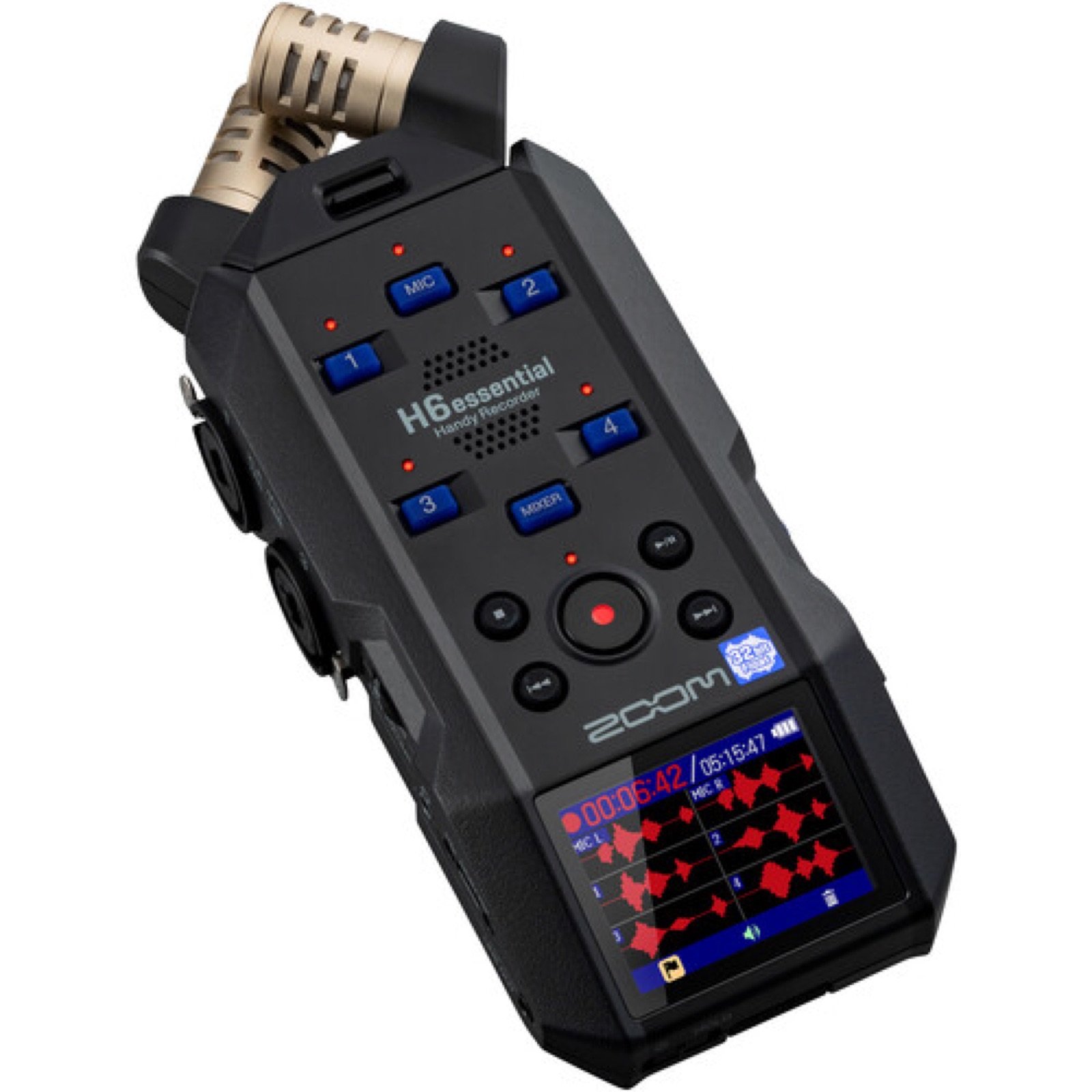
The comedy setup: Plug an XLR cable from the stage mic (via splitter) into Input 1. Point the built-in mics toward the audience. Hit record. You now have the comedian’s voice on Track 1 and audience reactions on Tracks L/R, completely separate, ready to mix in post. You can even plug in additional microphones on Inputs 2-4 if you want dedicated audience mics in different positions.
Why it’s #1: The 32-bit float means you never worry about levels. The six-track capability means you can capture every source separately. It runs on 4 AA batteries or USB-C power. It doubles as a USB audio interface for podcasting. And at $300, it’s half the price of many professional alternatives.
Also great for: Podcast recording in green rooms, man-on-the-street interviews, recording writing sessions.
2. Zoom H4essential: ~$220 (Best Budget Multi-Track)
The H4essential is the H6essential’s more affordable sibling. Same 32-bit float recording, same built-in X/Y mics, but with two XLR/TRS inputs instead of four. For most comedy recordings, two inputs is all you need, one for the comedian’s mic feed and the built-in mics for audience.
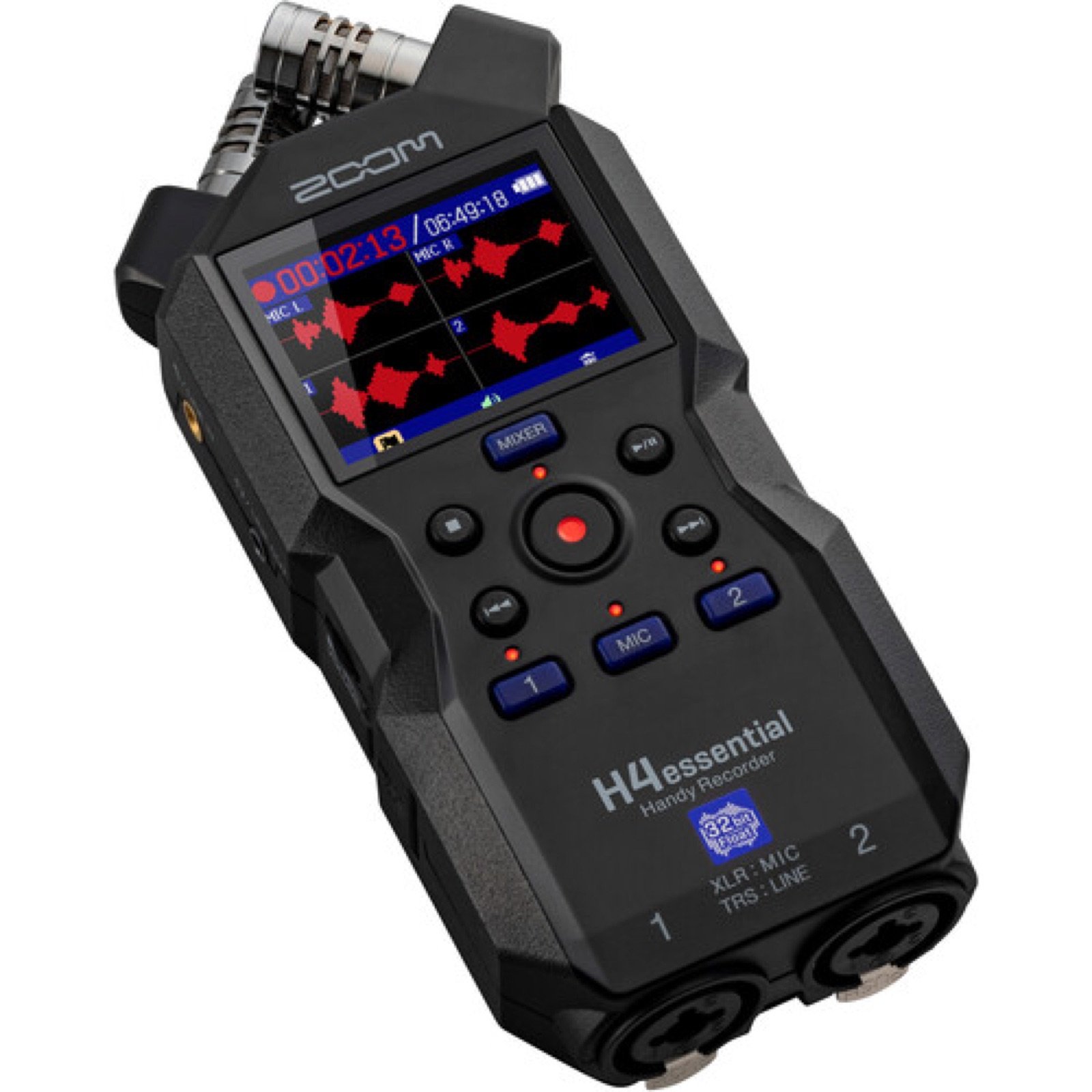
The comedy setup: Same as the H6essential but with fewer input options. If you’re only ever recording one comedian at a time and using the built-in mics for crowd audio, this does everything the H6essential does for $100 less.
Why it’s great: At $200 with 32-bit float, this is the best value in comedy audio recording. If you’re a comedian who wants to start recording your own sets properly but doesn’t want to spend $300+, start here. The built-in mics are identical quality to the H6essential.
3. Tascam Portacapture X8: ~$400 (Premium Touchscreen Option)
The Tascam Portacapture X8 is a 6-track recorder with a large color touchscreen, 32-bit float recording, and four XLR/TRS inputs plus built-in A-B stereo microphones. The touchscreen makes setup and level monitoring much more intuitive than button-based recorders.
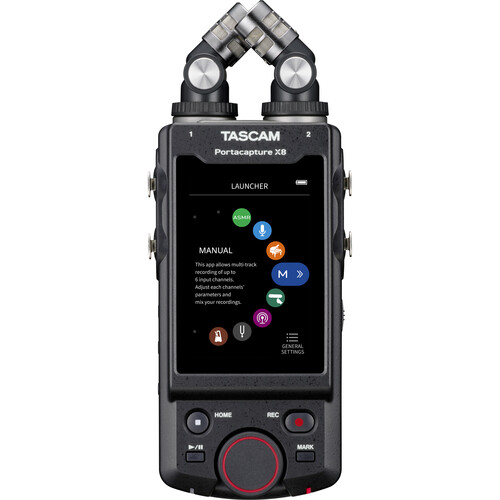
Why consider it over the Zoom: The touchscreen interface is genuinely easier to use, especially if you’re not an audio person. The X8 also has “Podcast” and “Music” recording modes that auto-configure settings, which can be helpful if you’re not sure how to set things up manually. The built-in mics can handle up to 137dB SPL (louder than a jet engine), so even the rowdiest comedy crowd won’t clip the built-in mics.
The downside: At $400 it’s $100 more than the H6essential for essentially the same capability. You’re mostly paying for the touchscreen and the slightly higher max SPL on the built-in mics. For most comedy recordings, the Zoom is the better value.
Compact Field Recorders: Small, Serious, Professional
4. Zoom F3: ~$300 (Best Compact Pro Recorder)
The Zoom F3 is a tiny 2-channel field recorder designed for professional film and audio work. It has 32-bit float recording, two locking XLR inputs, and runs for 8+ hours on AA batteries. It does NOT have built-in microphones. It’s designed exclusively for external mic recording.
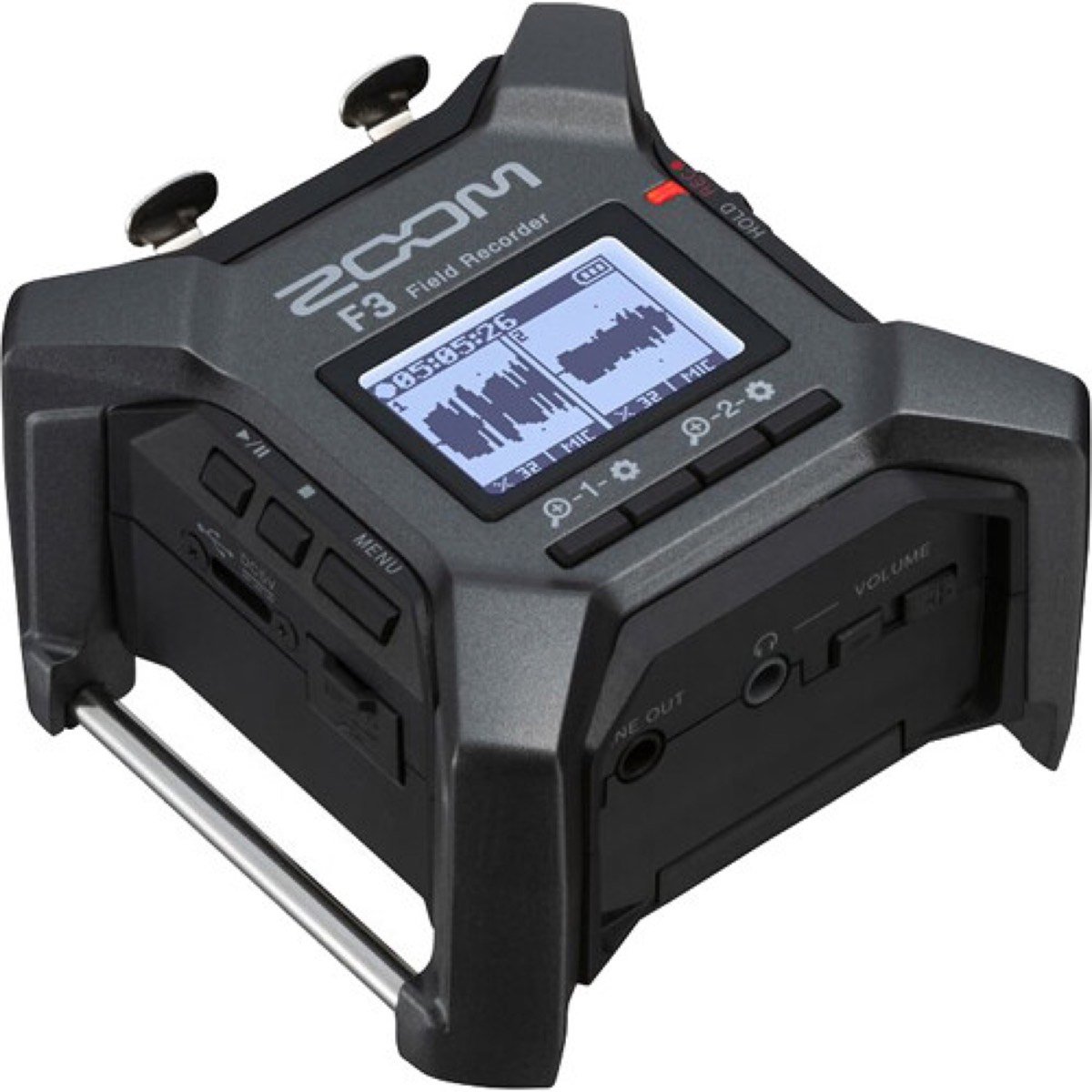
The comedy setup: Plug the comedian’s mic feed into Input 1 and an external audience mic into Input 2. Or use two audience mics if you’re getting the comedian’s audio through your camera. The F3 is small enough to velcro to the bottom of a mic stand or tuck into a sound bag.
Why it’s great: The F3 has the same professional-grade preamps found in Zoom’s $800+ F-Series recorders. The 32-bit float means zero gain adjustment. Just plug in and record. It’s the size of a deck of cards, making it easy to hide in any venue setup. Audio engineers love this thing because it’s essentially foolproof.
The downside: No built-in mics. If you want to capture audience reactions without buying a separate microphone, get the H6essential or H4essential instead. The F3 is for people who already have or plan to buy external microphones.
Wireless Microphone Systems: Comedian Lavalier Audio
These aren’t traditional “recorders”. They’re wireless microphone systems that clip onto the comedian and send audio to your camera or a separate recorder. They’re ideal for situations where you can’t access the venue’s sound system.
5. Rode Wireless GO (Gen 3): ~$170 (Latest & Best Wireless)
The Rode Wireless GO (Gen 3) is the latest version of Rode’s wildly popular wireless microphone system. It comes with two transmitters (each with a built-in microphone) and one receiver. Each transmitter has 32-bit float onboard recording, meaning it stores a backup recording internally even if the wireless signal drops.
The comedy setup: Clip one transmitter to the comedian’s shirt. Clip the second transmitter somewhere in the audience area to capture crowd reactions. Connect the receiver to your camera’s audio input. You now have comedian + audience audio wirelessly feeding your camera, plus backup recordings stored on each transmitter.
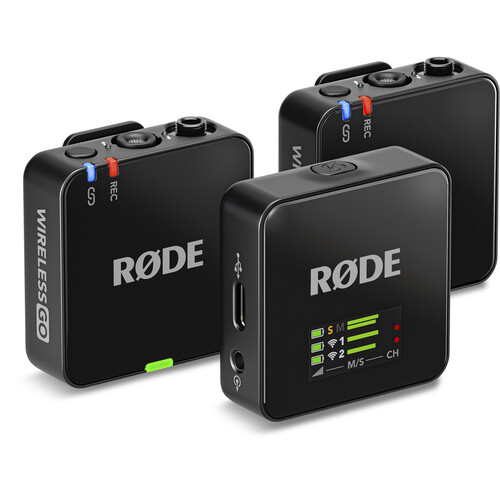
Why it’s great: Zero cables. Setup takes 30 seconds. The 32-bit float onboard recording means you always have a clean backup. The dual transmitters give you two separate audio sources (comedian + audience) feeding into one receiver. Battery life is around 7 hours per charge.
The downside: At $300 for the dual system, it’s not cheap. The built-in transmitter mics are good but not as clean as a proper XLR mic feed from the stage. And you’re relying on the comedian to wear the transmitter, which not everyone is willing to do.
6. Rode Wireless GO II: ~$240 (Proven Workhorse)
The Wireless Go II is the previous generation and still an excellent choice. Same dual-transmitter design, same built-in microphones on each transmitter, same onboard recording capability. The main differences from the Go III: no 32-bit float on the onboard recordings, and slightly shorter wireless range.
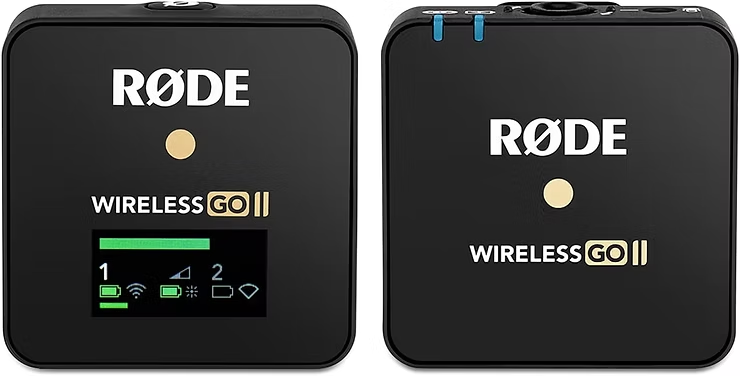
Why consider it over the Go III: It’s about $50 cheaper and widely available. The audio quality of the wireless transmission is essentially identical. If you don’t care about 32-bit float backup recordings, this saves you money for nearly the same experience.
Both the Go II and Go III accept external lavalier microphones (like the Rode Lavalier Go, ~$80) via a 3.5mm input on each transmitter, which gives you better audio quality than the built-in mic if you want to invest further.
Lavalier Recorders: Tiny, Clip-On, Dead Simple
7. Tascam DR-10L Pro: ~$200 (Clip It and Forget It)
The Tascam DR-10L is a tiny recorder with an attached lavalier microphone that clips directly onto the comedian. It’s smaller than a pack of cards, weighs almost nothing, and records to a microSD card. The comedian clips it to their belt or waistband, tucks the lav mic under their collar, and forgets about it.
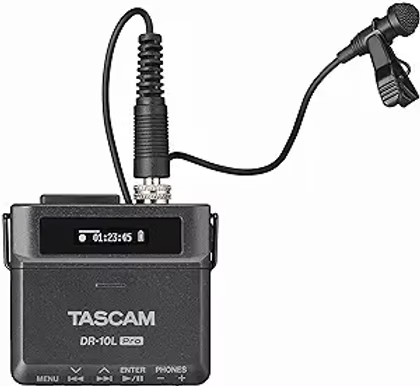
Why it’s great for comedy: It automatically records a backup safety track at a lower volume. So if the main recording clips during an unexpected audience eruption, you have a lower-level backup that’s perfectly usable. This feature alone has saved recordings for me multiple times. The simplicity is also a huge advantage. There’s essentially one button (record) and one setting (level). No menus, no screens to navigate during a show.
The downside: This only captures the comedian’s voice. You still need a separate solution for audience audio (phone, camera mic, or another recorder). Also, the attached lavalier is permanently connected. You can’t swap in a different mic.
Professional-Grade: For Specials and Showcase Recordings
8. Sound Devices MixPre-3 II: ~$1,000 (The Professional Standard)
The Sound Devices MixPre-3 II is what professional sound engineers bring to comedy special recordings. It has three XLR inputs with the cleanest preamps in the business, 32-bit float recording, timecode support for syncing with multiple cameras, and a build quality that inspires absolute confidence.
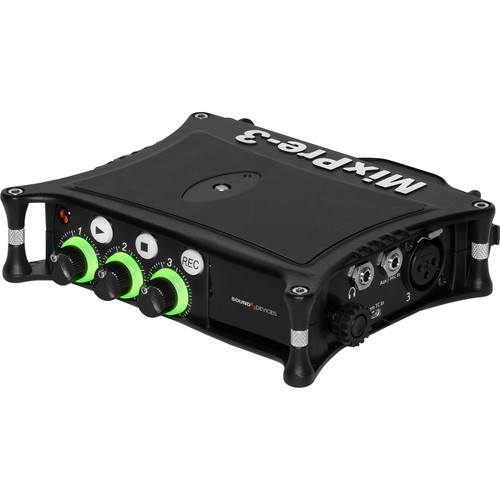
When to buy this: If you’re recording a special, filming a pilot, or doing professional production work where audio quality is non-negotiable and you’re syncing with multiple cameras. For weekly open mic recordings and social media clips, this is overkill, the Zoom H6essential does the job for less than half the price.
Why it costs more: The preamps are quieter (less self-noise), the build quality is tougher, it supports timecode for professional multi-camera sync, and Sound Devices has a reputation in the film industry that justifies the premium for paid production work.
The Free Option Everyone Forgets
9. Your Phone: $0
Don’t overlook this. A modern smartphone placed on a table in the audience section, recording with the built-in voice recorder app, captures surprisingly decent crowd audio. It also serves as a backup video angle (wide shot) simultaneously.
The comedy setup: Set your phone on a table in the first or second row, leaning against a glass or a phone stand. Open your voice recorder or camera app. Hit record. The phone captures audience laughs, and if you’re recording video, you get a backup wide shot for free.
When this is enough: If you’re just starting out and can’t afford a recorder yet, record the comedian’s set on your camera and your audience audio on your phone. Sync them in editing. This costs $0 and produces noticeably better results than camera-only audio.
Audio Setup Combos by Budget
Here’s what I’d actually bring to a comedy show at each budget level.
Starter Setup (~$0-200)
| Source | Device | Cost |
|---|---|---|
| Comedian audio | Camera mic or phone near PA speaker | $0 |
| Audience audio | Second phone on audience table | $0 |
Total: $0. Not ideal, but dramatically better than camera-only audio. Mix the PA-proximity recording (clear voice) with the audience phone recording (laughs) in editing.
First upgrade ($200): Add a Zoom H4essential. Plug into the board or use a splitter on the stage mic for clean comedian audio. Built-in mics capture audience. One device replaces both phones.
Mid-Range Setup (~$200-500)
| Source | Device | Cost |
|---|---|---|
| Comedian audio (direct feed) | Zoom H6essential or H4essential (XLR input from stage mic via splitter) | $200-$300 |
| Audience audio | Same recorder’s built-in mics (point toward crowd) | Included |
| Backup/alternative | Phone on audience table | $0 |
Total: $200-$300 + a $20 XLR splitter and $15 XLR cable. This is the sweet spot for most working comedians. The Zoom recorder captures the comedian’s mic on one track and audience on another, all in 32-bit float so you never worry about levels. The phone is free insurance.
Professional Setup (~$500-1,000+)
| Source | Device | Cost |
|---|---|---|
| Comedian audio (direct feed) | Zoom F3 or Sound Devices MixPre-3 II (XLR from stage mic) | $300-$1,000 |
| Comedian backup | Rode Wireless GO (Gen 3) transmitter clipped to comedian | ~$170 |
| Audience audio (wide) | Zoom H6essential or Rode GO (Gen 3) second transmitter near audience | $0-$330 |
| Audience backup | Phone on audience table | $0 |
Total: $600-$1,250. This is the setup for recording a special or a showcase you’re planning to sell. Multiple redundant sources for both comedian and audience audio, all in 32-bit float, with backup recordings on the Rode transmitters. If any single device fails, you still have usable audio from another source.
Common Audio Mistakes Comedians Make
After years of recording shows, these are the audio mistakes I see constantly.
1. Relying only on camera audio. Your camera’s built-in microphone is sitting 20-40 feet from the stage in a dark room full of ambient noise. It picks up the PA system bouncing off walls, the bartender making drinks, conversations at nearby tables, and AC hum. The comedian’s voice sounds distant and muddy. This is the single most common reason comedy clips sound amateur, and it’s completely fixable with a $200 recorder and a $20 XLR splitter.
2. Recording the comedian but not the audience. Clean comedian audio with no crowd reactions makes it sound like the comedian is performing to an empty room. Even if the audience was howling, your clip won’t show it. Always capture crowd audio, even a phone on a table is enough.
3. Setting levels too conservatively. With older (non-32-bit-float) recorders, comedians often set levels low to avoid clipping, then end up with recordings that are too quiet and full of hiss when boosted. If you’re using a 32-bit float recorder, this problem doesn’t exist. If you’re using an older recorder, set your levels so the loudest expected moments (big audience laughs) peak around -6dB to -3dB.
4. Forgetting to hit record. It sounds ridiculous but it happens all the time. You set up everything perfectly, the show starts, and 15 minutes later you realize you never pressed record. Develop a pre-show checklist: batteries charged, storage space available, record button pressed, red light visible.
5. Not doing a test recording before the show. Show up 10 minutes early. Record 30 seconds of the room with the house music playing. Play it back. Are all your inputs working? Is the XLR connection solid? Are the built-in mics picking up the room? This 30-second test has saved me from entire shows of silence more times than I’d like to admit.
6. Bringing dead batteries. Rechargeable AA batteries lose charge sitting in a bag. Fresh alkaline batteries or a USB power bank are more reliable for shows. Most Zoom recorders run 4+ hours on alkalines, which is more than enough for any comedy show. Always bring spares.
7. Ignoring the recording until editing. You don’t need to babysit the recorder during the show (especially with 32-bit float), but glance at it between sets to make sure it’s still recording. A bumped cable, a full SD card, or an accidental button press can end your recording without you noticing.
Conclusion
Good comedy audio comes down to three things: capture the comedian’s mic directly, capture audience reactions separately, and use a recorder that handles the dynamic range of a live comedy show.
Here’s the cheat sheet:
Best all-around recorder: Zoom H6essential (~$330). Six tracks, 32-bit float, built-in mics for audience, four XLR inputs for direct feeds. Does everything.
Best budget recorder: Zoom H4essential (~$200). Same 32-bit float, two XLR inputs, built-in mics. Everything most comedians need for $100 less.
Best wireless option: Rode Wireless GO (Gen 3) (~$300) or Wireless Go II (~$250). Clip it on the comedian and go. No cables, no venue cooperation needed.
Best for specials/pro work: Sound Devices MixPre-3 II (~$1,000) or Zoom F3 (~$300) with external mics.
Best free option: Your phone on an audience table capturing crowd audio, mixed with whatever your camera picks up.
The technology has gotten dramatically better and cheaper in the last few years. 32-bit float recording, which eliminates the need to set levels, used to be a feature reserved for $1,000+ professional equipment. Now it’s in a $200 Zoom recorder. There has never been a better time to upgrade your comedy audio.
For camera body recommendations, read our complete camera buying guide. For lens selection, see our lens guide. For the step-by-step filming process, see our how to film stand-up comedy guide.
Now go record something.
Frequently Asked Questions
What’s the single best audio recorder for stand-up comedy?
The Zoom H6essential (~$330). It has 32-bit float recording so you never clip, four XLR inputs for connecting to the venue’s sound system, built-in stereo microphones for capturing audience reactions, and six tracks so you can record everything separately. It does everything a comedian needs in one device, and it doubles as a podcast recorder.
Can I just use my camera’s built-in microphone?
You can, but the results will sound amateur. Camera mics pick up room echo, PA bounce, bar noise, AC hum, and ambient chatter. The comedian’s voice sounds distant and muddy. Even a $200 recorder with a direct mic feed will dramatically improve your audio quality. If you’re posting clips to social media and want people to actually watch them, separate audio recording is not optional.
Do I need separate recordings of the comedian and audience?
Yes. A direct mic feed of the comedian gives you clean, clear vocals but no audience reactions. Built-in recorder mics or a phone in the audience give you laughs but muddy vocals. Record both separately and mix them in editing. This is how every professional comedy recording is done.
What is 32-bit float and do I need it?
32-bit float recording technology makes it essentially impossible to clip (distort) your audio, no matter how loud the sound is. You don’t need to set recording levels. Just press record and adjust volume in post-production. For comedy clubs, where audio levels swing wildly between quiet joke setups and explosive audience laughs, this is extremely valuable. Every new recorder worth buying in 2026 has it.
How do I connect my recorder to the venue’s sound system?
The easiest method is an XLR splitter (~$20). Unplug the XLR cable from the stage mic, plug it into the splitter, then run one output to the venue’s PA system and the other to your recorder. Alternatively, ask the sound tech for a direct feed from the mixing board. Either way, you need an XLR cable (about $15 for a 25-foot cable) and a recorder with an XLR input.
Can I use a Zoom H1 or other budget recorder without XLR?
Recorders without XLR inputs (like the Zoom H1essential at ~$100) can only capture audio through their built-in microphones or a 3.5mm input. They work fine for audience audio capture or as a general room recorder, but you can’t connect them directly to a venue’s sound system for a clean comedian mic feed. For the best comedy recording, you want at least one XLR input. The Zoom H4essential at $200 is the cheapest recorder with both XLR inputs and 32-bit float.
How much storage do I need?
A 32GB microSD card holds roughly 6-8 hours of multi-track 32-bit float WAV recording at 48kHz. A typical comedy show is 1-3 hours. A 64GB card gives you plenty of room for an entire night of recording with space to spare. Cards are cheap. Buy a 64GB or 128GB and never worry about it.
What’s the minimum I should spend on audio recording?
$0 if you use your phone creatively (one phone near the PA for voice, one in the audience for laughs). $200 for a Zoom H4essential that handles everything properly with 32-bit float. $200 is the sweet spot where you cross the line from “amateur audio” to “sounds professional”, and it’s a one-time purchase that lasts years.
This post was originally published on ComedyMemphis.com and has been completely rewritten for 2026 with current recorder recommendations, 32-bit float technology guidance, and expanded setup instructions. For camera recommendations, check out our complete camera buying guide. For lens selection, see our lens guide. For the step-by-step filming process, see our how to film stand-up comedy guide. And for more guides on growing your comedy career, visit our blog.